
Intro
A while ago when i had my EdgeRouter setup i had IPv6 configured and i could assign IPv6 addresses on my Proxmox VM’s if necesairy. But since i’ve moved to FortiGate i couldn’t get IPv6 to work on my ISP which is KPN in The Netherlands. Is has been a strugle on how to set this up correctly where i needed to catch up on my IPv6 knowledge to get it to work eventually. This article will guide you through setting up IPv6 on FortiOS 7.4 or 7.6 with KPN Fiber
Table of Contents
Synoptis
Below is a clean FortiOS 7.6 “known-good” way to run:
- WAN1 has VLAN6 assigned to the interface
- A PPPoE tunnel interface called KPN-PPoE is on top of VLAN6 (optional)
- KPN PPPoE gets DHCPv6-PD (/48) on the WAN
- VLAN10 gets a routed /64 out of that /48
- Clients get IPv6 via SLAAC
- Clients learn DNS via RDNSS (in Router Advertisements)
This matches the Fortinet docs approach for SLAAC and RA options.
WAN (KPN-PPPoE): get Prefix Delegation (/48)
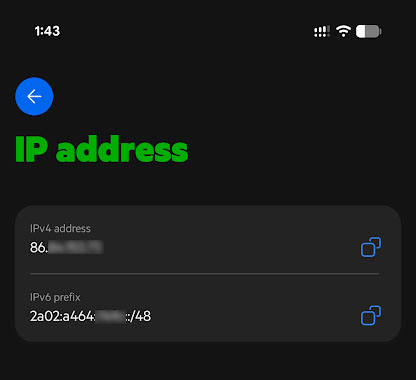
In order to get your IPv6 subnet assigned to you we have to lookup the IPv6 prefix. For that you have to login to you MijnKPN app (on your phone) and go to Products and then to Internet. At the bottom under “Manage on the fly” you’ll find “IP address”
Here you will find your IPv4 address as well as your IPv6 prefix.
Best is to configure the IPv6 settings via the CLI. You can get a few settings in through the GUI, but eventually you’d have to switch anyway. So we’re going to do all the configuration step via the CLI
The reason i have this configuration is because that i played around with a lot of settings and didn’t bother to break down the PPPoE interface.
This is an overview of how i stacked the PPPoE interface on top of the VLAN6 interface

So log into a SSH shell either through the GUI or with a SSH client.
For reference this is the config of my WAN1
config system interface
    edit "wan1"
        set vdom "root"
        set allowaccess ping
        set type physical
        set alias "KPN-FTTH"
        set role wan
        set snmp-index 1
        config ipv6
            set ip6-allowaccess ping
        end
        set mtu-override enable
        set mtu 1514
    next
end
And this is the config of my VLAN6
config system interface
    edit "KPN-VLAN6"
        set vdom "root"
        set allowaccess ping
        set monitor-bandwidth enable
        set role wan
        set snmp-index 27
        set dns-server-override disable
        set interface "wan1"
        set mtu-override enable
        set mtu 1506
        set vlanid 6
    next
end
What we first need to configure is enabling the dhcp6-prefix-delegation.
config system interface
    edit "KPN-PPPoE"
        set vdom "root"
        set mode pppoe
        set allowaccess ping
        set type tunnel
        set estimated-upstream-bandwidth 1000000
        set estimated-downstream-bandwidth 1000000
        set role wan
        set snmp-index 34
        config ipv6
            set ip6-mode dhcp
            set dhcp6-prefix-delegation enable
            config dhcp6-iapd-list
                edit 1
                    set prefix-hint 2a02:a464:749c::/48
                next
            end
        end
        set interface "KPN-VLAN6"
    next
end
Then verify if we got the prefix delegation assigned
config system interface
edit KPN-PPPoE
get
You’ll see that KPN has delegated the prefix to you

If not diagnose the PD request
diagnose ipv6 address list | grep KPN-PPPoE -A5LAN (VLAN10): give the FortiGate a static IPv6 on the /64
Now that we have the upstream with our prefix delegate working we can assign a static IPv6 ip address to our VLANs
From KPN we got a /48 block assigned from which we will use a /64 block per VLAN. We can have up to 65.536 /64 blocks in our assigned /48 block
Pick your /64 from the /48. For example i chose to incorporate the VLAN ID in my addressing scheme.
So, for VLAN10 that would be 2a02:a464:xxxx:10::1 and for VLAN20 2a02:a464:xxxx:20::1 and so forth
- VLAN10 = 2a02:a464:xxxx10::/64
- FortiGate on VLAN10 = 2a02:a464:xxxx:10::1/64
Configure VLAN10 like this:
config system interface
  edit "VLAN10"
    config ipv6
      set ip6-mode static
      set ip6-address 2a02:a464:xxxx:10::1/64

      set ip6-send-adv enable

      set ip6-manage-flag disable
      set ip6-other-flag disable
    end
  next
end
Why these flags?
- manage-flag = “use DHCPv6 for address assignment” → disable when you want SLAAC addresses.
- other-flag = “use DHCPv6 for other info (like DNS)” → disable if you want DNS via RDNSS
Make VLAN10 actually advertise the /64 for SLAAC (ip6-prefix-list)
This is the part that makes clients generate their own IPv6 in …:10::/64.
config system interface
  edit "VLAN10"
    config ipv6
      config ip6-prefix-list
        edit 2a02:a464:xxxx:10::/64
          set autonomous-flag enable
          set onlink-flag enable
        next
      end
    end
  next
end
Why these flags?
- autonomous-flag = “Use SLAAC (Stateless Address Autoconfiguration) for clients” → enable when you want to assign SLAAC addresses to your clients
- onlink-flag = “Tells the client that the announced IPv6 prefix is locally available on the same physical or logical network” → enable when you want clients in the same prefix to reach eachother without going through the router
Verify Router Advertisements contain the prefix
diagnose sniffer packet VLAN10 "icmp6 and ip6[40] == 134" 6 0 aYou should see the RA length grow and include the prefix.
Enable DNS Server on VLAN10
Although you could use the DNS server supplied by KPN, the operation of the FortiGate it is better if you’d enable your own local DNS server.
A minimal configuration would look something like this
config system dns-server
    edit "fortilink"
        set mode forward-only
    next
    edit "VLAN10"
        set dnsfilter-profile "dns-default"
    next
end
Advertise DNS via RDNSS
Add RDNSS entry on VLAN10
config system interface
  edit "VLAN10"
    config ipv6
      config ip6-rdnss-list
        edit 2a02:a464:xxxx:10::1
          set rdnss-life-time 1800
        next
      end
    end
  next
end
Why this flag ?
- rdnss-life-time = “Defines how long (in seconds) IPv6 clients should trust the advertised DNS server → 1800 (30 minutes) is ideal for SLAAC
Verify RA contains the DNS server
diagnose sniffer packet VLAN10 "icmp6 and ip6[40] == 134" 6 0 aIn the hexdump you’ll see … 0010 … 0001 … patterns for :10::1.
IPv6 firewall policy (LAN → Internet)
For IPv6 you must use policy6 (IPv4 and IPv6 policy tables are separate on FortiGate).
If you use SD-WAN (virtual-wan-link) for Internet
Create policy6:
config firewall policy
  edit 0
    set name "VLAN10_v6_to_Internet"
    set srcintf "VLAN10"
    set dstintf "virtual-wan-link"
    set srcaddr6 "all"
    set dstaddr6 "all"
    set action accept
    set schedule "always"
    set service "ALL"
    set logtraffic all
  next
endUse set dstintf “KPN-PPPoE” instead.
Routing sanity checks
Check default route is via KPN-PPPoE
get router info6 routing-tableYou want something like:
- S* ::/0 … KPN-PPPoE
- C 2a02:a464:xxxx:10::/64 … VLAN10
Client verification (Windows)
Refresh IP configuration
- Disable/enable Wi-Fi, or:
- ipconfig /release6
- ipconfig /renew6
Check
ipconfig /all should show:
- IPv6 Address in 2a02:a464:xxxx:10::/64
- Default gateway = FortiGate’s link-local on VLAN10 (that’s normal)
- DNS = 2a02:a464:xxxx:10::1

Online Verification
For a final verification if IPv6 is working go to test-ipv6.run and run a test. If everything has been set up correctly you should pass with 10 out of 10

Debug Commands
Watch Router Solicitations / Advertisements
diagnose sniffer packet VLAN10 "icmp6 and ip6[40] == 133" 4
diagnose sniffer packet VLAN10 "icmp6 and ip6[40] == 134" 6 0 a
Watch DNS traffic
diagnose sniffer packet VLAN10 "host 2a02:a464:xxxx:10::1 and (port 53 or port 853)" 4Watch IPv6 traffic attempts
diagnose sniffer packet VLAN10 "ip6" 4Routing table
get router info6 routing-tablePing on Windows
ping -6 google.nlTracert on Windows
tracert -6 google.nlConclusion
Took me a full day to get this up and running, but in the end it we’re just a couple of CLI commands to get IPv6 working. Now i have a fully routable IPv6 stack on my FortiGate behind KPN without the need for NAT.
PayPal
If you like my work, please consider supporting.